Interactive On-Chart Parameter Adjustment for Dynamic Trend Analysis
TPR PRO Runtime Control is an interactive feature designed to give traders more direct control over the Trend Pullback Reversal (TPR) indicator while analyzing live market charts.
Available exclusively in TPR PRO, Runtime Control allows traders to adjust key TPR calculation parameters directly from an on-chart control panel. Instead of repeatedly opening the indicator’s properties window, changing settings, and returning to the chart, traders can explore different parameter configurations within their existing chart workspace.
The purpose is simple: make TPR parameter adjustment more convenient, interactive, and visually intuitive.
By combining direct parameter control with immediate visual feedback, Runtime Control helps traders understand how different settings influence trend identification, pullback analysis, and the indicator’s overall behavior across different market conditions.
TPR PRO Runtime Control is available on cTrader, MetaTrader 4 (MT4), MetaTrader 5 (MT5), NinjaTrader 8, MultiCharts x.NET, and Sierra Chart. Although the underlying purpose is consistent across these platforms, the control panel’s appearance, interaction methods, and certain operational details may differ according to each platform’s implementation.
1. Adjust TPR Parameters Directly on the Chart
Traditional indicator configuration typically requires traders to open an indicator settings dialog, locate the desired parameter, enter a new value, and confirm the changes before evaluating the result.
Runtime Control provides a more direct alternative.
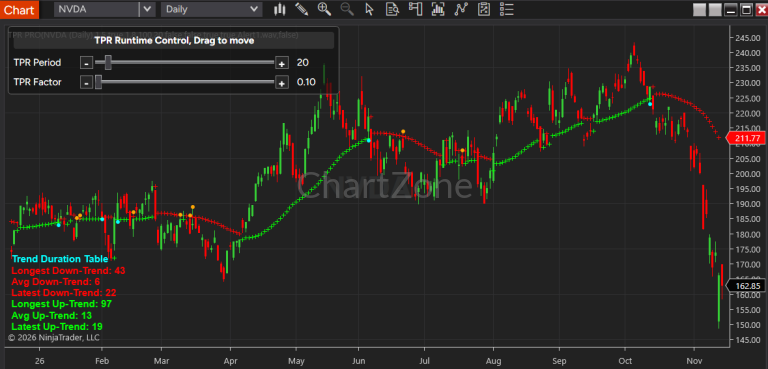
The control panel places the supported parameter controls within the chart environment, allowing traders to adjust the indicator while keeping their attention on price action.
Depending on the platform implementation, the interface may provide interactive sliders, increment and decrement buttons, or other parameter-adjustment controls.
These controls allow traders to explore different settings without repeatedly navigating through the standard indicator configuration interface.
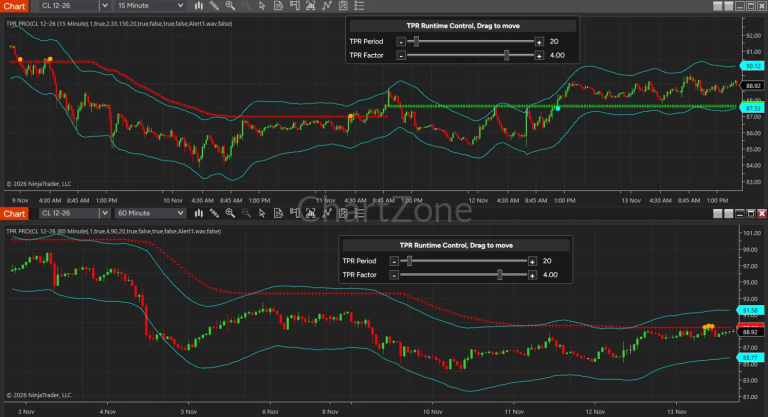
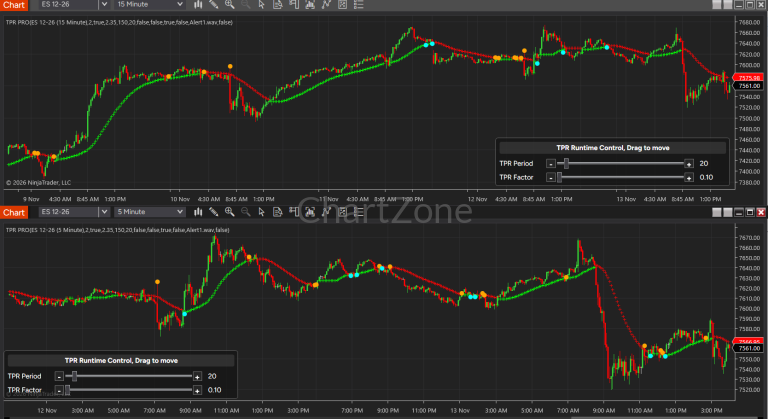
This is particularly useful when comparing multiple configurations during discretionary market analysis, studying historical price behavior, or learning how TPR responds to different combinations of parameters.
2. Understand the Relationship Between Factor and Period
Two important parameters in TPR analysis are Factor and Period. Runtime Control makes it more convenient to explore how these settings affect the indicator’s behavior.
Factor
The Factor parameter influences TPR’s trend sensitivity and the placement of its dynamic trend boundaries.
Changing Factor can alter how the indicator responds to price movement and how much room its trend structure allows for market fluctuations.
Depending on the selected configuration, traders may observe differences in trend changes, boundary placement, and the way price interacts with the TPR structure.
Period
The Period parameter influences the historical data considered by the TPR calculation.
Changing Period can affect the indicator’s responsiveness to recent price movements and its ability to filter shorter-term fluctuations.
A shorter Period generally produces a more responsive trend structure, while a longer Period generally emphasizes broader price behavior.
Factor and Period work together. Their combined effect depends on the instrument, timeframe, chart type, and market conditions.
Runtime Control allows traders to investigate these relationships directly on the chart rather than relying exclusively on descriptions or theoretical explanations.
3. Observe Changes Through Immediate Visual Feedback
One of the principal advantages of Runtime Control is the ability to evaluate parameter changes visually.
After a supported parameter adjustment, TPR recalculates and updates its indicator output according to the selected settings and the platform’s implementation.
Traders can then examine how the revised configuration changes the chart’s analytical structure.
For example, they can compare:
- How quickly the indicator recognizes a change in trend direction.
- How the dynamic trend boundary follows price.
- How pullbacks appear within the prevailing trend structure.
- How the revised settings behave during sideways markets.
- How the indicator responds to sharp price movements and temporary countertrend fluctuations.
- How alternative configurations represent the same historical market conditions.
This immediate feedback creates a more interactive learning and analysis process.
Rather than making an isolated parameter change and trying to remember its previous effect, traders can study the resulting chart and develop a clearer understanding of the relationship between parameter values and indicator behavior.
The purpose is not to identify one universally optimal setting. It is to help traders understand the available configurations and choose settings appropriate to their analytical objectives.
4. Explore Different Levels of Trend Sensitivity
Different trading approaches require different perspectives on market behavior.
A trader studying short-term intraday movements may prefer a more responsive configuration. A trader analyzing a broader directional move may prefer a configuration that filters out more short-term fluctuations.
Runtime Control makes it easier to explore these alternatives.
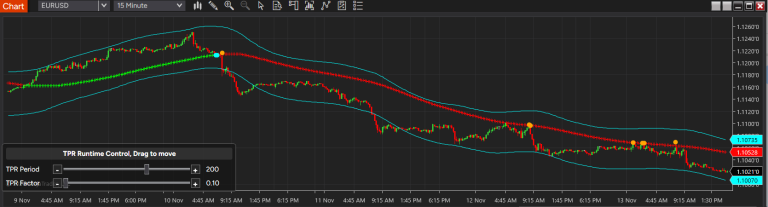
For example, a trader might begin with Factor = 2 and Period = 100, then experiment with a shorter Period or a different Factor to see how the TPR structure changes.
The trader can examine whether the revised configuration provides a useful perspective on recent price action without losing sight of the broader trend.
Alternatively, the trader may increase Period to investigate whether a smoother trend structure offers a clearer view of the dominant market direction.
These comparisons can help traders develop a better understanding of the trade-offs between responsiveness and stability.
Importantly, greater sensitivity does not automatically mean better signals, and a smoother trend structure does not necessarily produce better trading decisions. The appropriate configuration depends on the trader’s methodology and the market being analyzed.
5. Interactive Controls for Convenient Adjustment
TPR PRO Runtime Control is designed to simplify parameter adjustment through an on-chart interface.
Where supported by the particular platform implementation, the control panel can include the following interaction methods.
Slider Controls
Sliders provide a convenient way to explore parameter values across a range. Traders can make broader adjustments to examine how substantially different configurations affect the indicator.
Increment and Decrement Buttons
Dedicated plus (+) and minus (-) buttons allow traders to make smaller, more controlled adjustments.
These controls are useful when a trader has already identified a promising configuration and wants to investigate nearby parameter values.
Combined Adjustment Methods
Where both sliders and step buttons are available, traders can use the slider to find a general parameter range and then use the buttons to fine-tune the value.
The exact controls, adjustment increments, and supported ranges depend on the platform-specific implementation.
6. Movable Control Panel and Chart Workspace Management
A parameter control panel should provide convenient access without unnecessarily obstructing the information traders need to see.
Where supported, TPR PRO Runtime Control includes a movable panel that traders can reposition within the chart workspace.
This allows users to place the controls away from important price bars, trend boundaries, pullback structures, and other visual elements.
The ability to reposition the panel is particularly useful when working with charts that contain several indicators, multiple analytical overlays, or a large amount of historical price data.
Traders can arrange the interface to suit their chart layout and personal workflow.
The precise method of moving the panel may vary by platform.
7. Show or Hide Runtime Control
Runtime Control is intended to be useful when parameter adjustments are needed without becoming a permanent distraction during routine chart analysis.
Where supported by the platform implementation, traders can enable or hide the control panel through the indicator’s configuration properties.
When actively exploring different settings, the panel provides convenient access to the supported parameters.
When parameter adjustments are no longer necessary, hiding the panel can help maintain a cleaner chart presentation.
Hiding the interface is a workspace-management option; it does not, by itself, imply that the indicator has been disabled.
The exact visibility options and configuration behavior should be confirmed in the documentation for the selected platform.
8. A Practical Workflow for Using Runtime Control
Runtime Control can be incorporated into a structured TPR analysis workflow.
Step 1: Establish a Starting Configuration
Load TPR PRO on the chart and begin with a known Factor and Period combination.
Observe the current trend structure, the position of the dynamic boundary, and the way the indicator represents recent price movements.
Step 2: Adjust One Parameter at a Time
Change Factor while keeping Period fixed, or change Period while keeping Factor fixed.
This makes it easier to identify which parameter is responsible for the observed change.
Step 3: Examine the Visual Response
Observe how the updated indicator behaves around trend transitions, pullbacks, sideways price action, and strong directional moves.
Consider whether the revised configuration makes the market structure easier to interpret for your particular analytical objective.
Step 4: Compare Alternative Configurations
Explore a small number of reasonable alternatives rather than changing parameters without a clear purpose.
Compare how each configuration represents the same market conditions.
Step 5: Evaluate the Combined Settings
After understanding the individual effects of Factor and Period, investigate how the two parameters work together.
A useful configuration should be evaluated in the context of the instrument, timeframe, chart type, and trading methodology.
Step 6: Return to Market Analysis
Once you have finished experimenting, hide the Runtime Control panel if desired and continue your analysis using the selected configuration.
Parameter selection should remain part of a broader analytical process rather than being treated as a guarantee of future performance.
9. Runtime Control Across Supported Trading Platforms
TPR PRO Runtime Control is available for the following platforms:
cTrader
Runtime Control provides an on-chart method for interacting with supported TPR parameters within the cTrader environment. Users should refer to the cTrader-specific instructions for the available controls and their operation.
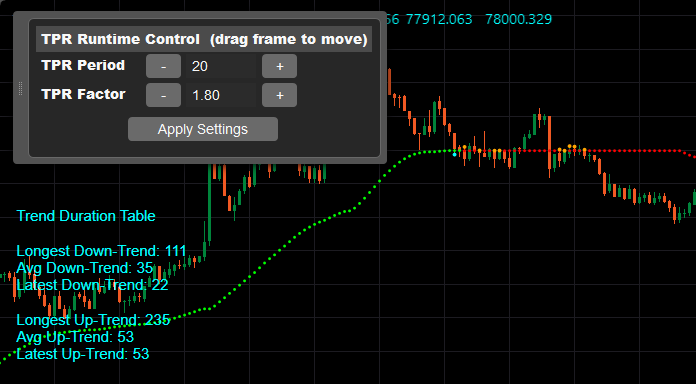
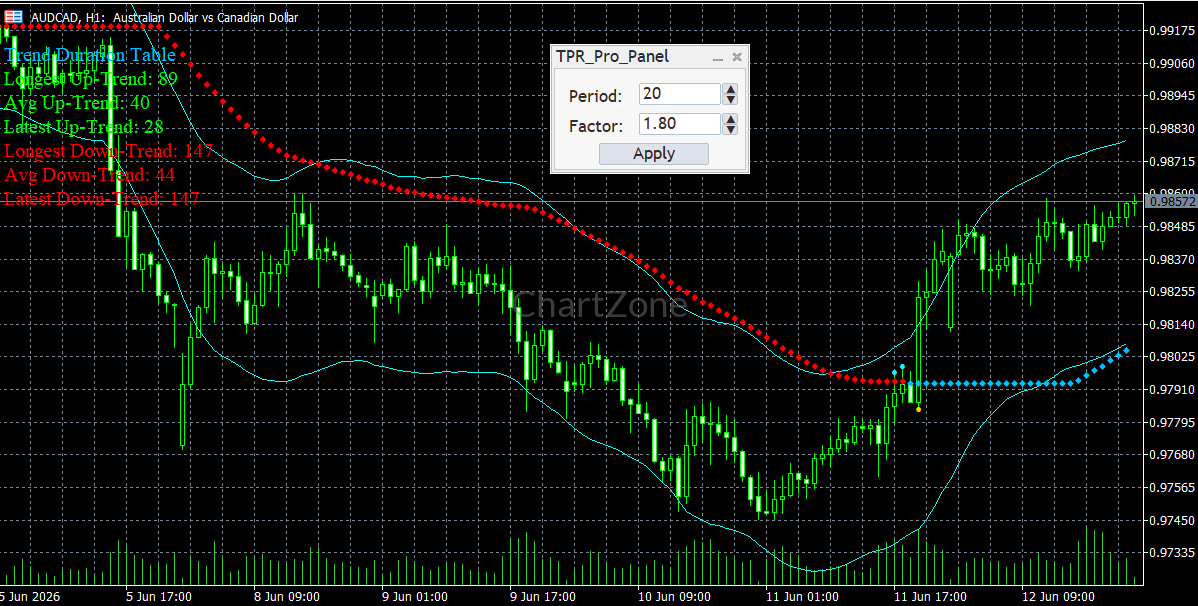
MetaTrader 4 (MT4) and MetaTrader 5 (MT5)
The MT4 and MT5 implementations provide Runtime Control for supported TPR parameters within the respective MetaTrader chart environments. Users should consult the documentation for their specific version because interface behavior and interaction details may differ.
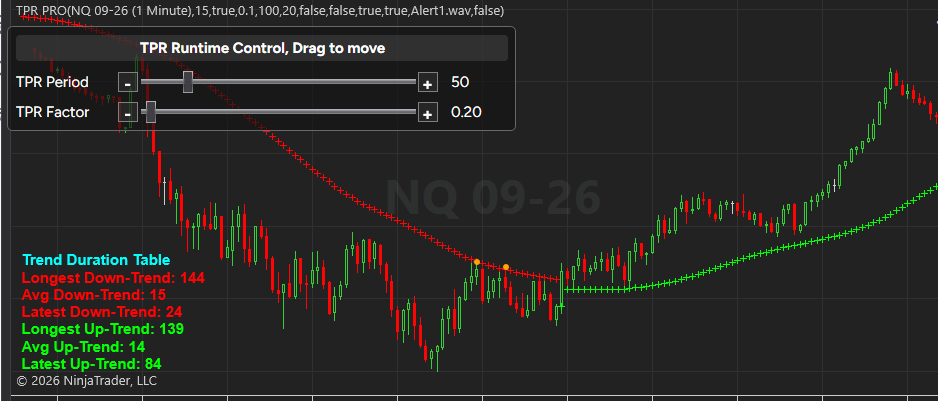
NinjaTrader 8
The NinjaTrader 8 implementation integrates Runtime Control into the TPR PRO charting experience, allowing supported parameter adjustments without relying exclusively on the standard indicator properties interface.
MultiCharts x.NET
The MultiCharts x.NET implementation provides its own platform-specific Runtime Control interface. Users should follow the MultiCharts x.NET instructions for the available controls and adjustment workflow.
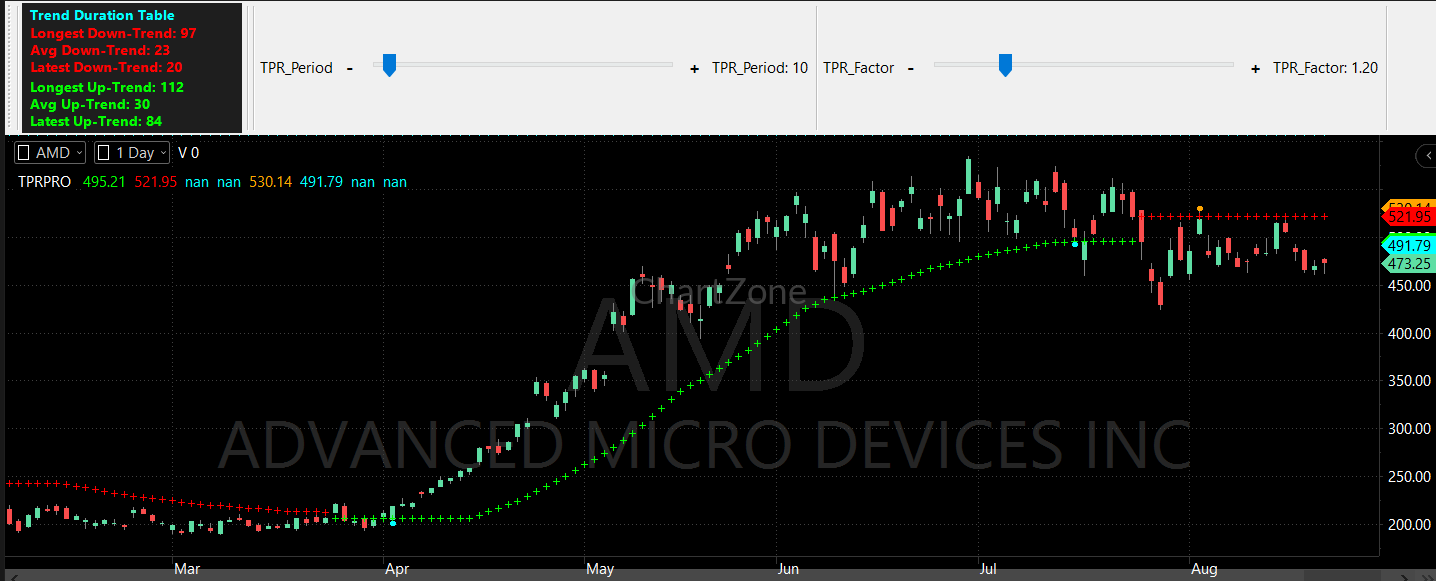
Sierra Chart
The Sierra Chart implementation provides a platform-specific way to interact with supported TPR parameters directly within the chart environment. The exact controls and interaction methods should be confirmed in the Sierra Chart documentation.
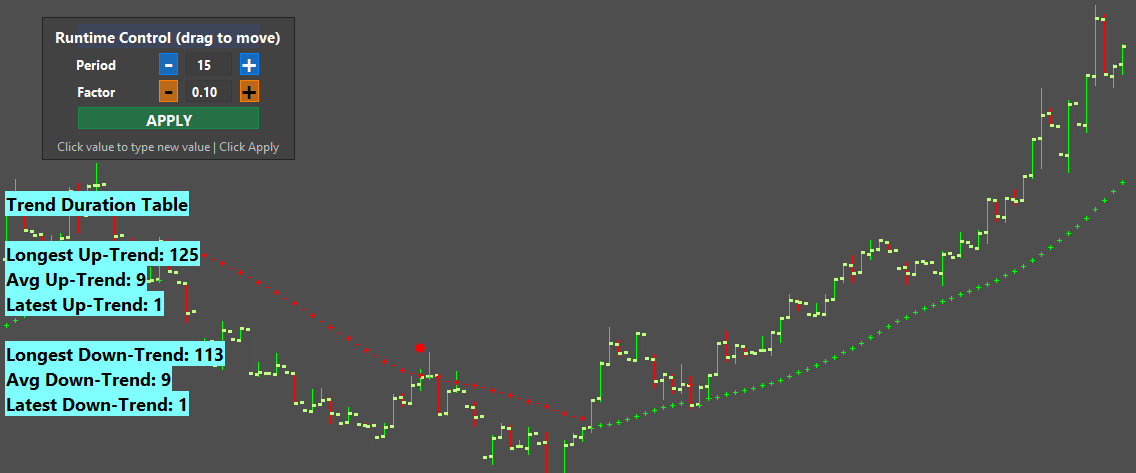
Cross-Platform Consistency
Across all supported platforms, the fundamental objective remains the same: make TPR parameter adjustment more accessible and help traders investigate how different settings affect the indicator.
However, the Runtime Control panel should not be assumed to look or operate identically on every platform. Users should refer to the documentation or demonstration video for their specific version.
10. Runtime Control Is Exclusive to TPR PRO
Runtime Control is a TPR PRO feature and is not available in the standard TPR version.
For traders who frequently compare parameter configurations, the ability to adjust supported settings directly on the chart provides an additional level of convenience and interaction.
It is especially useful for traders who want to understand the relationship between Factor, Period, and the resulting trend structure without repeatedly navigating through indicator properties.
TPR PRO combines the underlying Trend Pullback Reversal analytical framework with a more interactive way to explore its settings.
11. What Runtime Control Does Not Do
Runtime Control is a parameter-adjustment interface, not an automatic trading system or a substitute for market analysis.
It does not mean that the indicator automatically discovers the best parameters for every instrument or market condition.
Changing parameters can change how historical price action is represented, but a configuration that appears useful on historical charts is not guaranteed to perform equally well in future markets.
Traders remain responsible for evaluating the selected settings, understanding their methodology, and applying appropriate risk management.
Runtime Control should be viewed as a tool for interactive analysis and parameter exploration rather than a promise of improved trading results.
Conclusion: More Direct Control Over TPR Analysis
TPR PRO Runtime Control brings parameter adjustment into the chart-analysis workflow.
By making supported settings easier to adjust and their effects easier to observe, it helps traders explore different levels of trend sensitivity, investigate the relationship between Factor and Period, and develop a more informed understanding of TPR behavior.
Whether analyzing intraday futures, forex, stocks, indices, or other supported markets, traders can use Runtime Control to make parameter exploration more convenient and integrate it into their existing analytical process.
Available exclusively in TPR PRO for cTrader, MetaTrader 4, MetaTrader 5, NinjaTrader 8, MultiCharts x.NET, and Sierra Chart, Runtime Control adds an interactive layer to the TPR experience while preserving the central objective of the indicator: helping traders analyze trend, pullback, and potential reversal conditions within a unified framework.